



오늘도 기여를 하기 위해 여러가지를 검색하고 조사해 보았다.
벤치 마크 지표
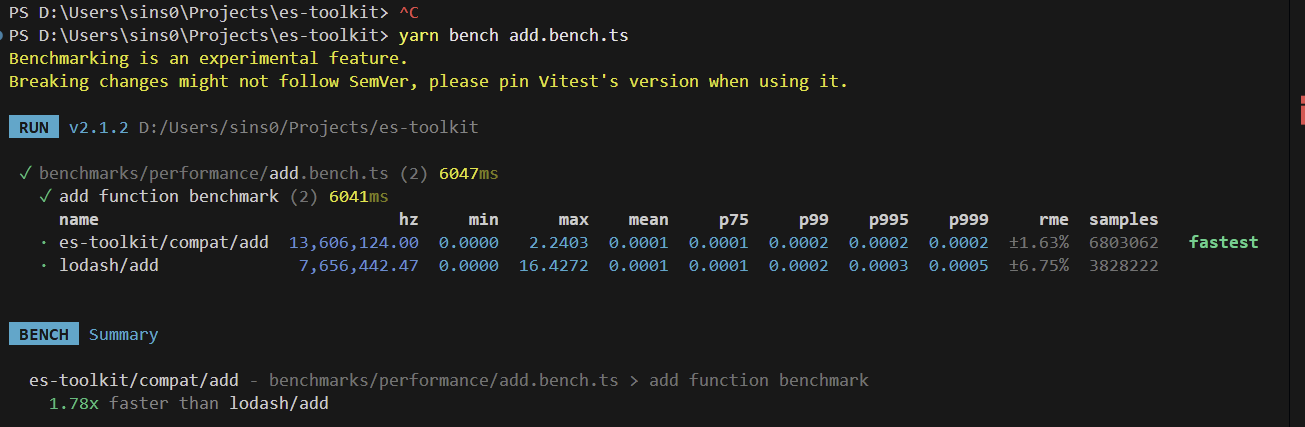
각 메서드에 마다 lodash, es-toolkit/compact, es-toolkit 으로 비교하며 성능 지표를 확인할 수 있다.
확실히 es-toolkit이 우세한 성능을 보인다. 내부 동작도 이해하기가 쉽다.
지표 전체 이름 의미 / 해설
| name | 테스트 이름 | 벤치마크 대상 함수의 이름(lodash/add, es-toolkit/add 등) |
| hz | operations per second | 1초 동안 실행된 횟수. 높을수록 더 빠르다는 뜻 |
| min | minimum time | 가장 빨리 실행된 1회 실행 시간(초 단위). 지연이 거의 0에 가까움 |
| max | maximum time | 가장 느리게 실행된 1회 실행 시간. 값이 높을수록 “스파이크(지연)” 발생 |
| mean | average time | 평균 실행 시간. 하지만 hz보다 정확하지 않음 (ops/sec 기준이 더 신뢰도 높음) |
| p75 | 75th percentile | 전체 실행 중 75%가 이 시간 이하로 끝났다는 의미 |
| p99 | 99th percentile | 전체 실행 중 99%가 이 시간 이하. tail latency 분석용 |
| p995 | 99.5th percentile | 99.5% 구간의 실행 시간. 지연 분포를 더 자세히 확인함 |
| p999 | 99.9th percentile | 거의 모든 실행(99.9%)이 이 시간 이하로 끝남. 성능 안정성 핵심 지표 |
| rme | relative margin of error | 상대적 오차율(±%). 낮을수록 데이터가 안정적이고 흔들림이 적다 |
| samples | number of samples | 수집된 샘플 수(= 벤치마크 반복 횟수). 함수가 빠르면 더 많이 수집됨 |
또한 기여를 해보고 싶어서 따로 파서 lodash 동작과 es-toolkit 동작이 다른것을 찾던 도중 다른 동작을 찾았는데 다음과 같았다.
메서드의 동작 비교하기
chunk라는 메소드 였다. 이 메소드는 size만큼 배열을 쪼개어 이차원 배열로 반환하는 함수이다.
  {
    title: "size = 0 (Lodash returns empty array, ES throws error)",
    arr: [1, 2, 3],
    size: 0,
  },
es-toolkit은 Error: Size must be an integer greater than zero라는 오류를 반환했고 lodash는 빈 배열을 반환했다.
ES Toolkit 철학
- 타입 안정성
- 런타임 에러 명확화
- 잘못된 값이 들어오면 조용한 실패를 허용하지 않음
따라서 결과 값 비교를 통해 찾을려면 es-toolkit/compact와 비교하는 것이 맞다.
es-toolkit/compact는 lodash와 정확히 동작이 같다.
사실상 이걸 다 비교하면서 결과값 다른 것을 찾기는 어렵다고 판단이 들어서 이후 메서드 하나를 분석해 보았다.
initial 메서드 분석
그전에 튜플에 대해 이해가 필요하므로 다음 링크를 참고하자
https://velog.io/@from_numpy/TypeScript-Tuple%ED%8A%9C%ED%94%8C
TypeScript - Tuple(튜플)
타입스크립트에는 자바스크립트엔 없는 굉장히(?) 유용한 타입인 “튜플”이 존재한다.이번 페이지에선 이 “튜플”의 구조 및 특징과 어떠한 장점으로써 쓰이는지 알아보고자 한다. 더욱이 “
velog.io
initial 메소드는 마지막 원소를 제외한 나머지 배열을 반환해주는 메서드이다.
/**
 * Returns an empty array when the input is a tuple containing exactly one element.
 *
 * @template T The type of the single element.
 * @param {[T]} arr - A tuple containing exactly one element.
 * @returns {[]} An empty array since there is only one element.
 *
 * @example
 * const array = [100] as const;
 * const result = initial(array);
 * // result will be []
 */
export function initial<T>(arr: readonly [T]): [];

/**
 * Returns an empty array when the input array is empty.
 *
 * @returns {[]} Always returns an empty array for an empty input.
 *
 * @example
 * const array = [] as const;
 * const result = initial(array);
 * // result will be []
 */
export function initial(arr: readonly []): [];

/**
 * Returns a new array containing all elements except the last one from a tuple with multiple elements.
 *
 * @template T The types of the initial elements.
 * @template U The type of the last element in the tuple.
 * @param {[...T[], U]} arr - A tuple with one or more elements.
 * @returns {T[]} A new array containing all but the last element of the tuple.
 *
 * @example
 * const array = ['apple', 'banana', 'cherry'] as const;
 * const result = initial(array);
 * // result will be ['apple', 'banana']
 */
export function initial<T, U>(arr: readonly [...T[], U]): T[];

/**
 * Returns a new array containing all elements except the last one from the input array.
 * If the input array is empty or has only one element, the function returns an empty array.
 *
 * @template T The type of elements in the array.
 * @param {T[]} arr - The input array.
 * @returns {T[]} A new array containing all but the last element of the input array.
 *
 * @example
 * const arr = [1, 2, 3, 4];
 * const result = initial(arr);
 * // result will be [1, 2, 3]
 */
export function initial<T>(arr: readonly T[]): T[];

/**
 * Returns a new array containing all elements except the last one from the input array.
 * If the input array is empty or has only one element, the function returns an empty array.
 *
 * @template T The type of elements in the array.
 * @param {T[]} arr - The input array.
 * @returns {T[]} A new array containing all but the last element of the input array.
 *
 * @example
 * const arr = [1, 2, 3, 4];
 * const result = initial(arr);
 * // result will be [1, 2, 3]
 */
export function initial<T>(arr: readonly T[]): T[] {
  return arr.slice(0, -1);
}
그래서 이런식으로 여러개의 타입을 지정한 이유는 여러 반환값 및 파람에 대해 타입이 다를 수 있기 때문이다.
몇 개만 골라서 살펴보면 다음과 같다.
/**
 * Returns a new array containing all elements except the last one from a tuple with multiple elements.
 *
 * @template T The types of the initial elements.
 * @template U The type of the last element in the tuple.
 * @param {[...T[], U]} arr - A tuple with one or more elements.
 * @returns {T[]} A new array containing all but the last element of the tuple.
 *
 * @example
 * const array = ['apple', 'banana', 'cherry'] as const;
 * const result = initial(array);
 * // result will be ['apple', 'banana']
 */
export function initial<T, U>(arr: readonly [...T[], U]): T[];
이거의 경우 아래와 같은 튜플에 대한 반환 타입을 정확히 지정하기 위해 쓰였다.
type Mixed = [number, boolean, string];
const arr: Mixed = [1, true, "a"];
아래와 같이 반환 값이 정확하게 나온다.
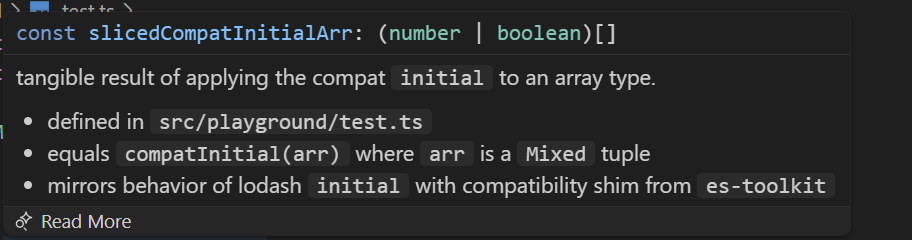
그에 반해 lodash는 반환 값이 기존 배열대로 나오게 된다.

/**
 * Returns a new array containing all elements except the last one from the input array.
 * If the input array is empty or has only one element, the function returns an empty array.
 *
 * @template T The type of elements in the array.
 * @param {T[]} arr - The input array.
 * @returns {T[]} A new array containing all but the last element of the input array.
 *
 * @example
 * const arr = [1, 2, 3, 4];
 * const result = initial(arr);
 * // result will be [1, 2, 3]
 */
export function initial<T>(arr: readonly T[]): T[];
이거는 보이는 그대로 타입이 하나인 배열에 대한 반환값 타입을 지정하기 위해 쓰였다.
오늘 느낀점
생각보다 열린 이슈들은 해결이 되었거나 메인 테이너 분들이 처리하셔서 기여할 거리를 찾기 어려워보인다.
그래도 여러가지를 배울 수 있어 좋은 것 같다.
'es-toolkit' 카테고리의 다른 글
| [es-toolkit] 기여 도전하기 1일차 (0) | 2025.11.26 |
|---|